Git Initials For Beginners 🚀
Hello! If you're reading this, chances are you've heard developers talking about Git and GitHub. And if you are starting your journey as a developer, one tool you will hear about very often is Git. Almost every software company uses Git in some form, and understanding it early will make our lives much easier as a programmer.
🔹 What is Git?
Git is a distributed version control system.
Git helps us:
Keep track of changes in the code
Save different versions of the project
Work with other developers without overwriting each other’s work
We can assume Git is like a time machine for our code ⏳
You can go back to previous versions whenever something breaks.
The "distributed" part means that every developer working on a project has a complete copy of the entire project history on their local machine.
🔹 Why Do Developers Use Git?
Back in the time when programmers made some changes in the project, they needed to circulate the whole code throughout the team members' systems using external storage. And whenever we try something new to project, then we need to make copies of it. And then the folder structure looks something like this….
my-project/
my-project-backup/
my-project-new-feature/
my-project-actually-working/
my-project-dont-touch/
It was a mess. Then I discovered Git, and everything changed. Here's why Git is so valuable:
1. Track Every Change Git remembers every modification we make. Added a new feature? Git knows. Fixed a bug? Git recorded it. Accidentally deleted an important file? Git can bring it back.
2. Collaborate Without Chaos. Multiple people can work on the same project simultaneously without overwriting each other's work. Git helps merge everyone's changes smartly.
3. Experiment Safely. Want to try a crazy new idea, but worried it might break everything? With Git, we can create a separate "branch" to experiment. If it works, great! If not, just delete it, and our main code stays untouched.
4. Professional Standard. Pretty much every company uses Git. Learning it now will make us more employable and help us contribute to open-source projects.
🔹 Git Basics and Core Terminologies
Let’s understand some important Git terms that every beginner should know.
📁 Repository (Repo)
A repository is a folder that contains:
Our project files
Git’s tracking data (hidden
.gitfolder)
It is where Git manages all versions of our project.
📝 Commit
A commit is like taking a snapshot of code at a specific point in time.
Each commit:
Has a unique ID
Contains a message describing what changed
Saves the current state of files
🌿 Branch
A branch is a separate line of development.
The default branch is usually called
mainWe can create new branches to work on features safely
Branches help to avoid breaking the main code
📌 HEAD
HEAD is a pointer that tells Git:
“You are currently here”
It usually points to the latest commit of the current branch.
🔹 Git Workflow
Mainly, Git Workflow contains three steps while attaining the processes:
Working Directory
Where we write and edit filesStaging Area
Where selected files go for the committedRepository
Where commits are permanently stored
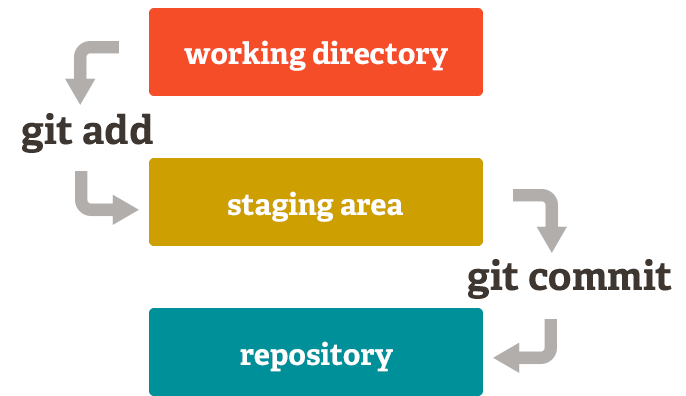
Internal Workflows

🔹 Common Git Commands
The following are some of the most common git commands:
→ git init
Initializes a new Git repository in the current directory.
git init
This creates a hidden .git folder in our project.
→ git status
Shows the current state of our files.
git status
It tells us:
Which files are untracked
Which files are staged
Which files are modified
→ git add
Moves files from the working directory to the staging area.
Add a specific file:
git add index.html
Add all files:
git add .
→ git commit
Saves staged files permanently into the repository.
git commit -m "Initial commit"
Here, we need to write clear and meaningful messages.
→ git log
Shows the history of commits.
git log
Here we can see:
Commit ID
Author
Date
Commit message